

SpeedView
You're looking at speed, distance and travel direction based on GPS on Android.
Developer Code Sector
Freemium · Android
SpeedView uses location data for a speedometer and route information. You can view a graph and export a track like GPX.
The accuracy depends on GPS reception and device. Do not use the telephone as a replacement for necessary vehicle equipment.
The linked extended version is offered in Google Play as a Legacy Edition and contains advertisements. Check availability on your current Android version.
Get more from SpeedView
GPS speed depends on a usable positioning. Tunnels, tall buildings and a weak signal can slow down or disrupt the display. Therefore, assess data in the conditions under which they were measured.
Set the app before you go on the road and don't operate it while driving. Only store location data consciously, because a route can show personal habits. In this older version also check the current availability and permissions on your device.
Version and updates
For SpeedView, the app store on your device determines which update you can install.
Who is it for?
Getting started
Privacy
Good to know
Please note
Advantages
- GPS speed and distance Chart GPX Export
Things to consider
- Location access required Reception affects measurements
Download SpeedView
The download page opens in a new tab.
Provider’s website · codesector.com
Version history
No previous versions are listed yet.
Report a new version
More from Code Sector

AudioField
You record voice and sound with adjustable audio formats on Android.

Direct Folders
You jump from Windows windows to open and save quickly to your favorite folders.
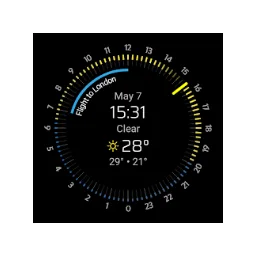
Nomad Watchface Pro
You are viewing weather forecast and upcoming appointments on a Wear OS dial.

TeraCopy 4.0.3 Build 2
With TeraCopy copy and move your files with a queue, error overview and control of the file contents.
Our verdict
SpeedView is useful for viewing a walk or ride, provided the app is available on your Android version. Set everything up before you leave and do not operate while driving. Check an exported route for abnormalities. Tunnels and poor reception can give strange values without actually moving like that.
Ratings
No ratings yet. Share your experience.
Log in to rate this software.
Comments
Share your experience. Comments appear after approval.
No comments yet.