
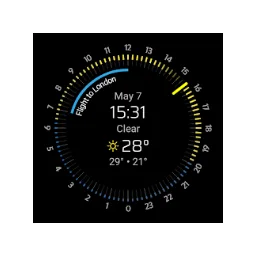
Nomad Watchface Pro
You are viewing weather forecast and upcoming appointments on a Wear OS dial.
Developer Code Sector
Paid · Wear OS
Nomad Watchface Pro combines hourly and daily expectations with a calendar view. You can check weather details and appointments from your watch.
You need a compatible Wear OS watch. Not every new watch version supports older dials, so check availability on the exact device before purchase.
Get more from Nomad Watchface Pro
A dial shall be readily readable on the small watch screen. Choose information that you really often need and check the display when wearing normally. Many parts at the same time can influence overview and battery life.
Weather and calendar depend on accessibility and provided access. Check with this older app if your current Wear OS device is supported. Only give permission for the parts you actually want to show.
Version and updates
For Nomad Watchface Pro, the app store on your device determines which update you can install.
Who is it for?
Getting started
Privacy
Good to know
Please note
Advantages
- Weather and Calendar Together Day and hour forecast Details from the watch
Things to consider
- Paid dial Compatibility varies by watch
Download Nomad Watchface Pro
The download page opens in a new tab.
Provider’s website · play.google.com
Version history
No previous versions are listed yet.
Report a new version
More from Code Sector

AudioField
You record voice and sound with adjustable audio formats on Android.

Direct Folders
You jump from Windows windows to open and save quickly to your favorite folders.

SpeedView
You're looking at speed, distance and travel direction based on GPS on Android.

TeraCopy 4.0.3 Build 2
With TeraCopy copy and move your files with a queue, error overview and control of the file contents.
Our verdict
Nomad will fit if you want to see appointments and get back on your wrist. Check first if Google Play offers installation on your watch. Only provide the required calendar and location permissions. To view normal time you do not need these additional functions; the added value is in the quick overview of your day.
Ratings
No ratings yet. Share your experience.
Log in to rate this software.
Comments
Share your experience. Comments appear after approval.
No comments yet.