

7-Zip
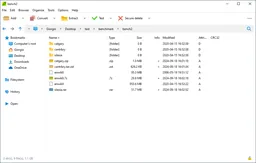
7-Zip lets you extract downloaded archives and bundle individual files into a single archive.
Developer Igor Pavlov
Version 26.03 · BSD-2-Clause, BSD-3-Clause, LGPL-2.1-or-later · Windows
Looking for an alternative to 7-Zip?Compare PeaZip.Compare alternatives7-Zip lets you extract downloaded archives and bundle individual files into a single archive. You can open ZIP files, among other formats, and create ZIP or 7z archives. This is useful when you want to store or send a collection of documents.
You choose the compression level. ZIP is often convenient for sharing, while 7z offers more compression and encryption options. Supported archives also let you protect file names with a password.
Download 7-Zip
Downloads are available for Windows.
Choose an archive the recipient can open
Choose ZIP when ease of extraction matters most for the recipient. Use 7z when you need its extra compression or encryption options. Hiding file names is a separate option in supported 7z archives. Test a protected archive by reopening it, and send the password through a different channel from the archive itself.
Compare 7-Zip with alternatives
If you want an alternative to 7-Zip, PeaZip is the other dedicated archive manager in this comparison. Both work with compressed files, but their interfaces, supported platforms and workflows differ. Consider which formats you need to create, whether you work in batches and how you share encrypted archives. Support for extracting a format does not necessarily mean the program can create it.
| Software | What can it do? | Platform and licence |
|---|---|---|
| 7-ZipYou are viewing this app | Create 7z and ZIP archives, among other formats, and extract many more. A compact Windows interface provides extensive control over compression and encryption. | WindowsBSD-2-Clause, BSD-3-Clause, LGPL-2.1-or-later |
| PeaZipView this alternative | You manage archives with a graphical interface, multiple formats and batch processing functions. That's an alternative if you want more file management around your archives. | Windows, macOS, LinuxLGPL-3.0-only |
Choose an alternative to explore its features, system requirements and download options.
Who is it for?
Use 7-Zip for collections of documents, downloaded installers or a folder you want to send to someone. It also suits anyone who wants precise control over compression level, format and encryption. Ongoing backups with retention periods and restore points require a separate backup solution.
Getting started
First extract an archive into a folder you can easily identify. When sharing an encrypted archive, send its password through a different channel.
Computer requirements
Windows; the graphical file manager is for Windows. Command-line versions are available for Linux and macOS.
Privacy
You create and open archives on your own computer. Encryption protects their contents; with a 7z archive, you can also encrypt the file names. Send the password through a different channel from the archive. Including the password in the same email as the attachment offers little protection if someone gains access to that mailbox.
Good to know
A smaller archive does not make its contents trustworthy. Photos and videos that are already compressed usually shrink very little.
Please note
You can extract RAR archives, but you cannot create new ones. Check an unfamiliar archive before running any programs extracted from it: extracting files does not check them for malware. Keep the password for an encrypted archive safe. Without the correct credentials, you cannot recover its contents through a standard password reset.
Advantages
- Open many common archive formats and create ZIP and 7z archives.
- Control compression and encryption.
- Creating archives locally does not require uploading your documents to an online compression service.
Things to consider
- A 7z file may be less convenient for the recipient to open than a ZIP file.
- Strong compression can take more time and memory.
- A standalone archive does not automatically track changes to the original folder.
Download 7-Zip
The download page opens in a new tab.
Provider’s website · www.7-zip.org
Version history
26.03
You will get enhanced archive support and solutions for security issues.
What’s new?
- You can process Joliet-ISOs and Compound archives better.
- For specially built archives, the Windows marking for internet downloads is maintained correctly.
- You'll also get error and security corrections.
Report a new version
Our verdict
7-Zip is a focused choice for extracting archives and creating compact file packages. Choose ZIP for broad compatibility, or 7z when compression and additional archive options matter more. Collections of text files can benefit particularly from compression. Do not expect a stronger setting to save much more space on photos and videos that are already compressed.
When sharing an archive, the recipient’s convenience matters more than the smallest possible file. For your own storage, a complete folder structure and passwords you can find again are more important. Check a new archive by extracting it elsewhere before deleting the source files. Treat it as a way to package files, not as a standalone backup plan that tracks later changes.
Ratings
No ratings yet. Share your experience.
Log in to rate this software.
Comments
Share your experience. Comments appear after approval.
No comments yet.